
Manufacturing ERP for job shops.
JobTraveler is built for custom manufacturers, machine shops and job shops. Run the whole production workflow, from quoting and job creation to shop floor operations, purchasing, inventory, shipping and invoicing, in one connected system.
With integrated AI and QuickBooks accounting integration, it streamlines operations without replacing the accounting software you already use.
- One company, one or more stores
- Statuses derived from facts
- Exports to QuickBooks Desktop
- AI assistant that confirms before it acts
Seven steps. Each line travels on its own.
A job is a customer order; its lines are the parts. Each line moves through the shop with its own route sheet, hours, purchases, deliveries and invoices. The route sheet is the traveller: printed, it follows the part across the floor and is scanned at the kiosk. The job's status follows its lines.
- Quote
- Job
- Routing
- Work
- Delivery
- Close and price
- Invoice
- The office
- The shop floor
- The money
Scope of work. Machine housing per drawing SH-2041 rev C. Weld mounting bracket. Final inspection; certificate of conformance required.
| Op | Operation | Machine | Est h | State |
|---|---|---|---|---|
| 10 | Saw to length | Saw 1 | 0.5 | Done |
| 20 | Mill housing | Mill 3 | 6.0 | Running · E-014 |
| 30 | Weld bracket | Weld | 1.5 | To do |
| 40 | Inspect | Inspect | 0.5 | To do |
-
Quote Sales
Parts priced from hours per work type and flat charges. A quote line becomes a job, or a job is entered directly.
Quote, printed or emailed -
Job Office
Customer, PO number, due date and the expedite flag. One line per part, each numbered like 1042-2.
OPEN -
Routing Planner
The route sheet lists the numbered operations for the floor and prints as the traveller on the leftabove.
Route sheetROUTED -
Work Shop
Hours per employee, job line and machine, from the office or the kiosk. Material and outside work charged to the line.
Time entriesPurchase orders -
Delivery Shipping
Delivery tickets record what shipped, with carrier and freight. Partial shipments are allowed.
Delivery ticketPARTIAL_DELIVERED → DELIVERED -
Close and price Administrator
Costs reviewed, the final unit price and commission set, the cost figures frozen, the line completed.
Job history sheetCLOSED -
Invoice Accounting
Shipped quantities billed, plus certification, environmental surcharge and freight. Released, then exported. A certificate of conformance prints from a template with the facts of the line.
InvoiceCertificate of conformanceINVOICED
See the period as a flow.
Jobs › Workflow draws the job lines of a period as bands, from quote to payment. The width of a band is how many lines went on from one step to the next. The grey boxes are where lines stopped and wait for someone. Pick a store and a period, select a step, and its records open below.
- Went on to the next step
- Stopped here, waiting
As a table
As a table
Where the money of a line went.
On Close and Price the administrator sees the job price as a flow: what it paid for in labour, material, outside services and commission, the labour split by machine group, and what is left as profit. Type a price under the costs and the loss comes in beside the price.
Beside it sits the same picture as estimated on the quote, with the estimated hours at today's labour rate, so the two differ only by the quantities.
Nobody sets a status by hand.
The status of a job line is computed from four facts after every change: whether a route sheet exists, how much shipped, whether the line was closed, how much was invoiced. Deleting a document moves the status back honestly.
The next actions come from the facts too, not from the label. Try it on the rightbelow.
if invoicedQty >= qty      -> INVOICED
else if invoicedQty > 0    -> PARTIAL_INVOICED
else if completed          -> CLOSED
else if shippedQty >= qty  -> DELIVERED
else if shippedQty > 0     -> PARTIAL_DELIVERED
else if routed             -> ROUTED
else                       -> OPEN
- OPEN
- ROUTED
- PARTIAL_DELIVERED
- DELIVERED
- CLOSED
- PARTIAL_INVOICED
- INVOICED
The job shop and the stock side, in one application.
One company, one or more stores. Every job, purchase order and stock record belongs to a store, and the dashboard narrows to one of them. An administrator decides which role sees which menu.
-
Jobs
Quotes, jobs, route sheets, time, the floor kiosk, deliveries, closing, certificates, and the shop's master data.
-
Inventory
Products, categories, units of measure, adjustments with a reason, imports and the audit log. On hand, available, allocated, on order per store.
-
Manufacturing
Bills of materials per store and revision. Manufacturing orders for stock or for a job line, with their shortages.
-
Sales
Sales orders of stocked items, picked, shipped and invoiced. Invoices, payments, clients, sales rules and terms.
-
Purchasing
Purchase orders for stock, for a manufacturing order, or charged to a job line as material or outside work. Receivers, vendors, terms, ship vias.
-
Accounting
Invoices released, then exported in batches to QuickBooks Desktop, posting to the GL accounts you set.
-
Reports
Journals, backlog, commission, customer history, valuation and the business summary. A period, presets, CSV export and a printed copy.
-
Settings and roles
Companies, stores, global settings and the menu per role. Administrators, users and the one kiosk account.
See what is short before you build.
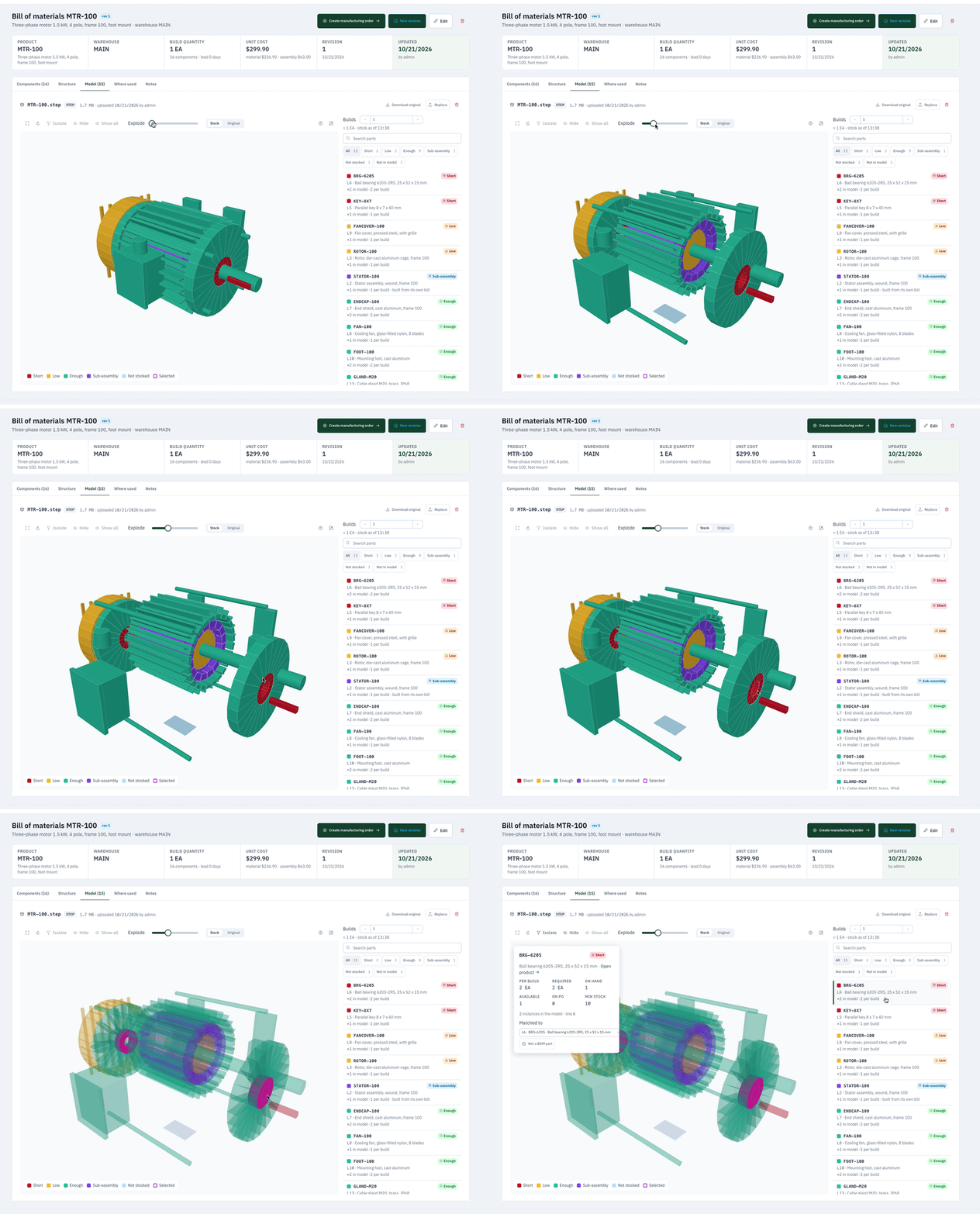
Put the STEP or IGES model on the bill of materials. JobTraveler reads it in the browser, matches each part to a line of the bill, and colours it by that line's stock for the number of builds you enter.
-
Coloured by stock
Short when what is available is less than what the builds require. Low when what is left would fall below the minimum stock. Sub-assemblies come from their own bill.
-
Matched to the bill
By product number, then description. Fix a match by hand, or mark a part as not a BOM part: the fixture, the fasteners drawn for looks.
-
Select a part, read its stock
Per build, required, on hand, available, on PO and minimum stock. A part on order stays short until it is received.
-
A viewer, not a CAD tool
Isolate, hide, explode and fit, with a finger on a tablet. One model per bill revision, up to 50 MB.
Your price book, as rules the whole office quotes from.
A configurable part prices itself from its answers. A pricing table gives the base price for the size. A price rule adds what the material, the finish, the quantity and the customer add. Whoever writes the quote gets the same price, with how it was made.
-
The same price, whoever quotes
The price comes from the answers and the rule, not from who is at the desk that day. Pricing stops living in one person's head.
-
Every price explains itself
The line keeps its base, the table bracket, the rule and its version, and the breakdown. Months later you can still say why a part cost what it did.
-
Overrides stay in sight
Type over a computed price and the line shows List $x under it, with Use list price to put it back. A discount given by hand is never hidden.
-
Bring the price book you have
Copy the grid from Excel or Google Sheets and paste it into the pricing table. The rule is edited as a table, with the keys of a spreadsheet.
-
Change prices without breaking quotes
Simulate runs an unsaved rule on a sample before anyone quotes from it. A saved line is priced again only when its size, answers, quantity or customer change, so old quotes and the jobs made from them keep their price.
-
Discounts in the same editor
Catalog, order line and whole-order discount tables, by customer, category, warehouse, quantity or date. The order discount is spread over the lines, so tax and invoices see the same numbers.
Scan a badge. Scan the route sheet. Tap a machine.
A touch-first page on a tablet with a barcode scanner. Hours come from the clock, not from typing. The machine's rate is frozen on the entry. Errors show large and plain, and the screen returns to the badge prompt by itself.
- E-<code>The badge. Shows the operator, what they have running, and their day so far.
- 1042-2The route sheet. Scan again to stop. Running entries appear on the office time board.
- M-<code>A machine label, or a tap. Indirect machines take hours without a job.
Scan the route sheet again to stop.
Ask the shop a question. Confirm before it acts.
A chat panel inside the application, answering with Claude through the shop's own tools, as the signed-in user. It sees what you see and may do what you may do, nothing more. Numbers come from the tools; it never estimates a quantity, a price or a date.
- Findjob 1042, inv 234, po 115, customer acme, a part number.
- Explaina job with every line, its status, what shipped and was invoiced, the next actions allowed, its cost and profit so far.
- Reportthe job flow, the backlog, the commission, a customer's history, what is shipped and not invoiced, what waits for export.
- Actmake a route sheet, post or correct time, make a delivery ticket, add a comment, invoice a job, release an invoice. Each change shown first, with a button to confirm.
-
The assistant, inside the app
Every record it mentions carries a link to its page. An error from a tool is a rule of the shop, such as a line that cannot take time or a quantity above what shipped. The assistant explains it rather than working around it.
-
The MCP endpoint, for your agents
The same tools over the Model Context Protocol. Claude Code, Claude Desktop or any MCP client connects with the user's own token and works as that user, with that user's roles. The server tells the agent to start with
whoamiandsearch. -
Confirmed, bounded, honest
Each change is shown in the chat and waits for a button. Writes are switched on per server, and where they are off the assistant says so. The kiosk account cannot use it. Nothing the tools answer is estimated.
- Common
- Jobs
- Shop floor
- Sales
- Purchasing
- Inventory
- Manufacturing
- Accounting
- Documents
Lists are paged, amounts are in the shop's currency, dates are ISO, and every record carries a link to its page. Tools that change data say so, and run only where writes are enabled.
Accounting. Release, then export to QuickBooks Desktop.
An invoice is released to accounting, then an administrator exports a batch as an IIF file for QuickBooks Desktop. Purchase orders go the same way. Payments are recorded where the settings say.
Reports. The backlog, the commission, a customer's history.
Every report runs on one page: a period with presets, its own filters, the table, a CSV export and a printed copy. Customer history prices repeat work from the hours and cost of the last run.
The dashboard. What needs attention, per store.
The job flow drawn as a flow with how many records sit in each step and what is late. Expedited and overdue lines first. Selecting a step opens its records.
See your shop as one flow.
Ask for a demo and we will walk through your own workflow, from quote to invoice, in under an hour.